
These are some frequently asked questions about printing name badges and using Big.first.name.
1. Trouble with printer alignment?
2. Which web browser should I use?
3. How do the subscription upgrades work?
4. Sticky labels? pin/clip badges? or Lanyards?
5. What labels sizes should i use?
6. Can Big.first.name create a MECARD or vCard format QRcode from submitted data for each badge?
7. What is the File Upload format?
8. How can I generate a CSV file from an excel spreadsheet?
1. Trouble with printer alignment?
We suggest testing printer alignment by printing on plain paper first.
On the 4. Print Settings tab you turn on the Corner Squares and Print Edges options.
The corner squares should be being printed fully in the corners of your paper, like in the images below
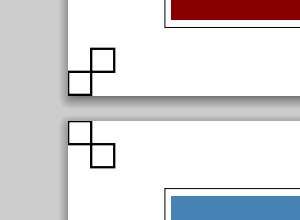
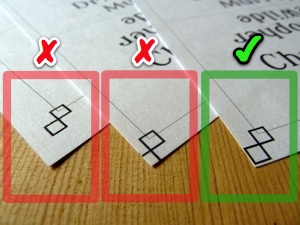
If they are being printed off the page or inside the page then all the badges will also be printed in the wrong positions.
When the Print Edges option is on then Big.first.name will print lines exactly where it thinks the edges of your badges should be.
You can test the alignment by holding the printed plain paper against some badge/label stock up to the light.
Make sure you have Page Scaling set to None in your printer settings as described in this blog post.
Also, make sure that you have the correct paper size selected. For some printers, you might need to select a special borderless paper size and then further fine-tune the borderless settings.
Also please make sure you have installed an up-to-date version of your printer drivers and Adobe Reader.
2. Which web browser should I use?
Big.first.name works best when using one of these free web browsers: Google Chrome or Mozilla Firefox.
3. How do the subscription upgrades work?
Upgrade your account to use our advanced designs and to allow for more events and attendees. Subscription payments are processed by Paypal (Visa, Mastercard & American Express accepted). A Paypal account is not required to subscribe.
When you subscribe, your Big.first.name account will be upgraded immediately.
You can cancel your subscription at any time (even before the end of your first month). Subscribing for less than a month is the way to use Big.first.name for just a single event.
The different Big.first.name subscription plans are described on the signup page or on your account page.
4. Sticky labels? pin/clip badges? or Lanyards?
Big.first.name supports printing sizes for use with sticky labels, clip badges, and lanyards.
If your event lasts for one day or less then we recommend the use of sticky labels. The advantages include:
Your guests can stick the label on themselves where they choose (ie. where they feel most comfortable displaying their name badge).
Sticky labels are also more environmentally friendly than plastic coated badges and lanyards.
You can quickly hand-write a label for unregistered guests.
They are cheaper and easier to produce.
They are less damaging to clothes than pins or clips.
For multi-day events badges or lanyards might be more suitable due to their durablity. If your lanyards allow the badge to twist around back-to-front then be sure to print a second copy of the name badge for the back side (this is easy to do with big.first.name). Simply printing more sticky labels for the multiple days of your event is another option.
5. What labels sizes should i use?
Many events make the mistake of using name badges that are too small. Assuming your badge stock paper is either size A4 or Letter then your badges shouldn't be any smaller than fitting 10 per page (ie. 2 across by 5 down).
Here are some suggested links to Amazon.
- North America: Avery Adhesive Name Badges, 2.33 x 3.375 inches, White, Pack of 160 (08395)
- UK & Rest-of-world: Avery J8173-100 White QuickDRY 99 x 57 mm Address Labels
6. Can Big.first.name create a MECARD or vCard format QRcode from submitted data for each badge?
Yes, the QR codes generated by Big.first.name will successfully encode MECARD or vCard. (We actually have two different QR code generators - either should work just fine). The hardest part is getting the MECARD or vCard information in the first place. Both formats have specific format/syntax but once the text string is ready it can be imported into the Big.first.name 'detail' field.
More information on the MECARD format can be found here and here
So an example workflow might be to first generate the information using some fancy Excel spreadsheet formulas and then export the resulting columns (ie. "Full Name", "MECARD" ) in CSV format which can then be imported into Big.first.name.
7. What is the File Upload format?
Uploaded files must bein plain text or CSV format.
Upload a file containing names, one per line, e.g.
Firstname Lastname
Another Name
optionally include detail information (e.g. company name) separated by a comma
Charles Jones, Detail Plc.
Jennifer Johnson, Acme Inc.
optionally include a custom first name in the 3rd field separated by a comma
Bartholomew Giesler, Detail Corp, Bart
Marjorie Jean, Bargins Inc, Marj
optionally include an avatar url in the 4th field separated by a comma
Coretta Harper, Devicentems Germany,    , http://example.com/corretta.jpg
Sampson Potter, Silickare Group    , Sam, http://example.com/sam.gif
Upload a file: TEXT or CSV (not .xls) with UTF8 encoding:
8. How can I generate a CSV file from an excel spreadsheet?
You'll need start with a sheet that only has 1, 2, or 3 columns in the format order required for importing into Big.first.name.
You might need to the Excel CONCATENATE function or other macros to massage your data into the right format and the right columns. Here is an example video showing how to use CONCATENATE https://www.youtube.com/watch?v=EJY3IEXndkA - more youtube videos and other tutorials can be found online, try searching for the help you need.
Once you have columns ready, e.g.,
Full Name, Detail
Jason Lee, Big.first.name Founder
you'll then need to use 'Save As' to save the data in CSV format. This short video is a quick demo of the process: https://www.youtube.com/watch?v=h05EOR4DwpA
The resulting CSV (UTF8 Format) file can be imported into Big.first.name.